
Project at a Glance
| Client | AEFreedomEscapes |
| Industry | Travel & Membership Benefits |
| My Role | Automation & Integration Developer |
| Platforms | WordPress, MemberPress, FluentForm, Microsoft SharePoint, Power Automate (Cloud) |
| Project Type | Two-way data synchronization & workflow automation |
| Duration | [Add duration] |
1. Overview
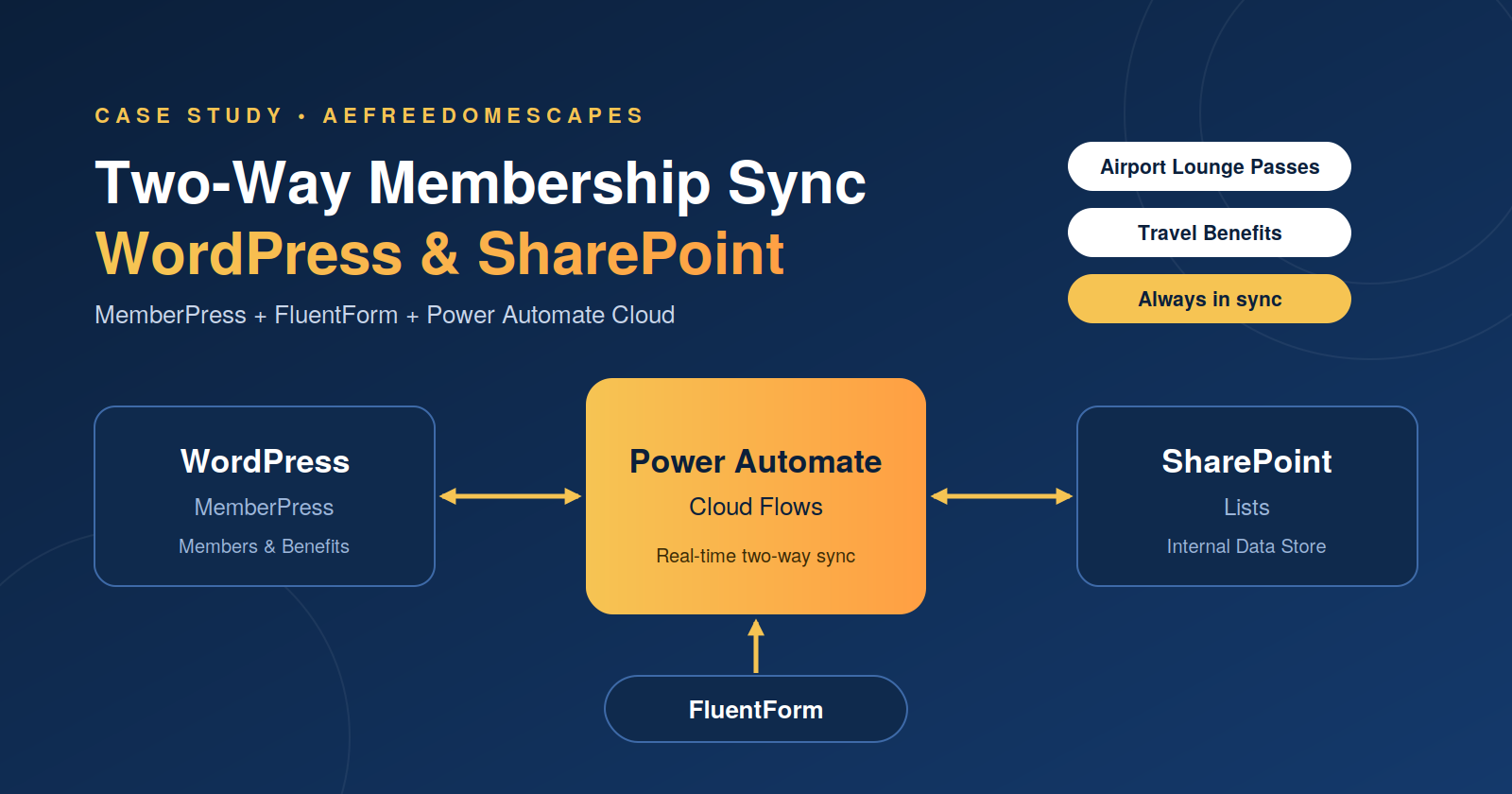
AEFreedomEscapes offers its customers real, tangible membership benefits such as airport lounge passes, travel perks, and exclusive travel benefits. These benefits are sold and managed through a WordPress website powered by MemberPress, while the internal team manages operational data in Microsoft SharePoint.
The goal of this project was to connect both systems so that data stays identical on both sides. If something changes in SharePoint, WordPress updates automatically, and if something changes in WordPress, SharePoint updates as well. All of this was achieved with Power Automate Cloud flows and FluentForm with no manual data entry.
2. The Challenge
Before this project, the business ran into the problems common to teams working across two disconnected systems:
- Duplicate data entry: Staff had to update member information and benefits in both WordPress and SharePoint by hand.
- Data inconsistency: A benefit changed in one system was often missing or outdated in the other.
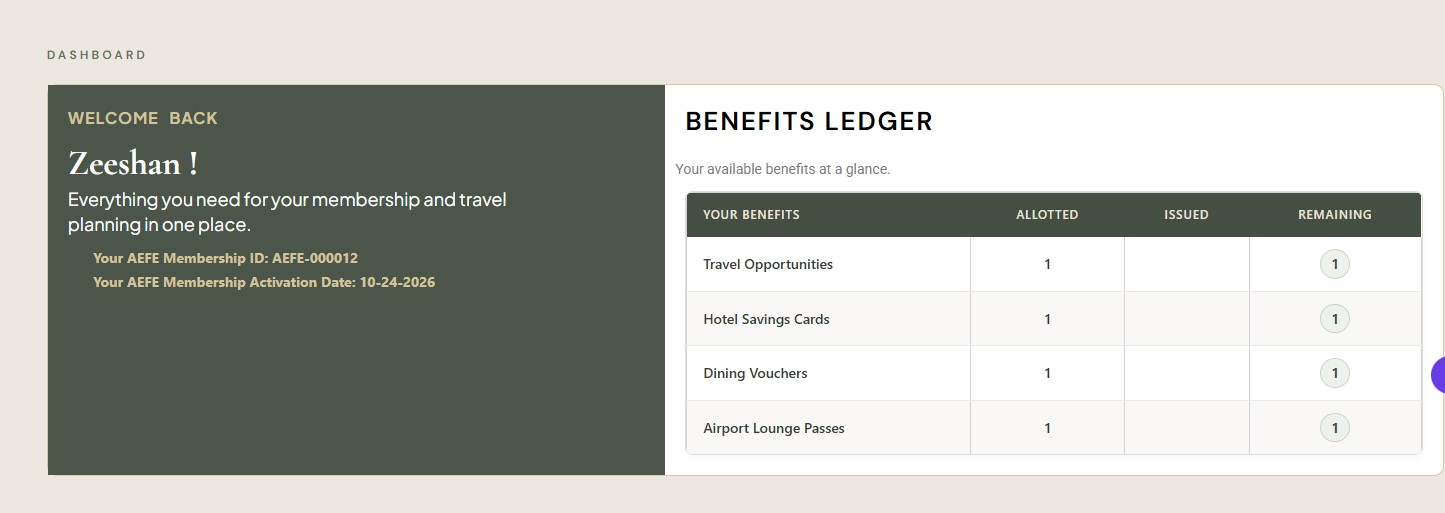
- Delayed updates: Customers could see outdated benefit information (for example, lounge pass availability) on their account.
- Form data silos: Information submitted through website forms was not reaching the internal SharePoint records.
- Scalability: As the number of members grew, manual syncing became slower and more error-prone.
3. The Goals
- Keep MemberPress and SharePoint in sync in both directions.
- Store all required FluentForm submissions directly in SharePoint.
- Ensure benefits such as airport lounge passes and travel benefits always reflect the latest data on both platforms.
- Remove manual work and reduce human error.
- Build a solution that is reliable, maintainable and uses the tools the client already had.
4. The Solution
I designed an automation layer using Power Automate Cloud that acts as the bridge between WordPress/MemberPress and SharePoint.
Key Components
| Component | Purpose |
|---|---|
| MemberPress | Manages memberships, member accounts and the benefits purchased |
| FluentForm | Collects form submissions that need to be stored in SharePoint |
| SharePoint Lists | Central internal data store for members and benefits |
| Power Automate Cloud Flows | Automates the sync logic in both directions |
| WordPress REST API / Webhooks | Allows Power Automate to read and write data on the website |
5. How It Works
5.1 WordPress / MemberPress → SharePoint
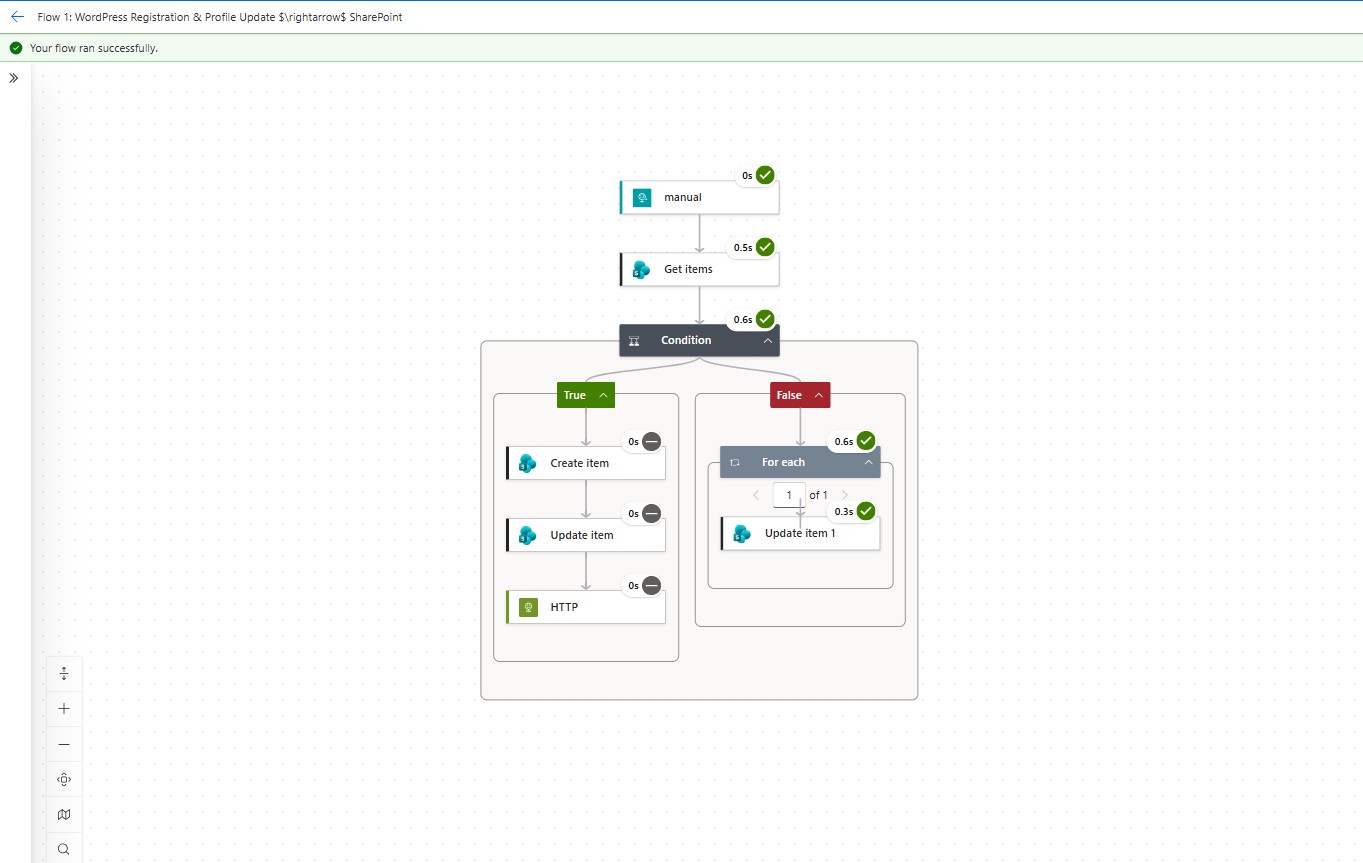
When something changes on the website (a new member signs up, a membership changes, or a benefit is updated), MemberPress fires a webhook/event that triggers a Power Automate flow. The flow checks whether the record already exists in SharePoint, then creates or updates the matching item.
5.2 SharePoint → WordPress / MemberPress
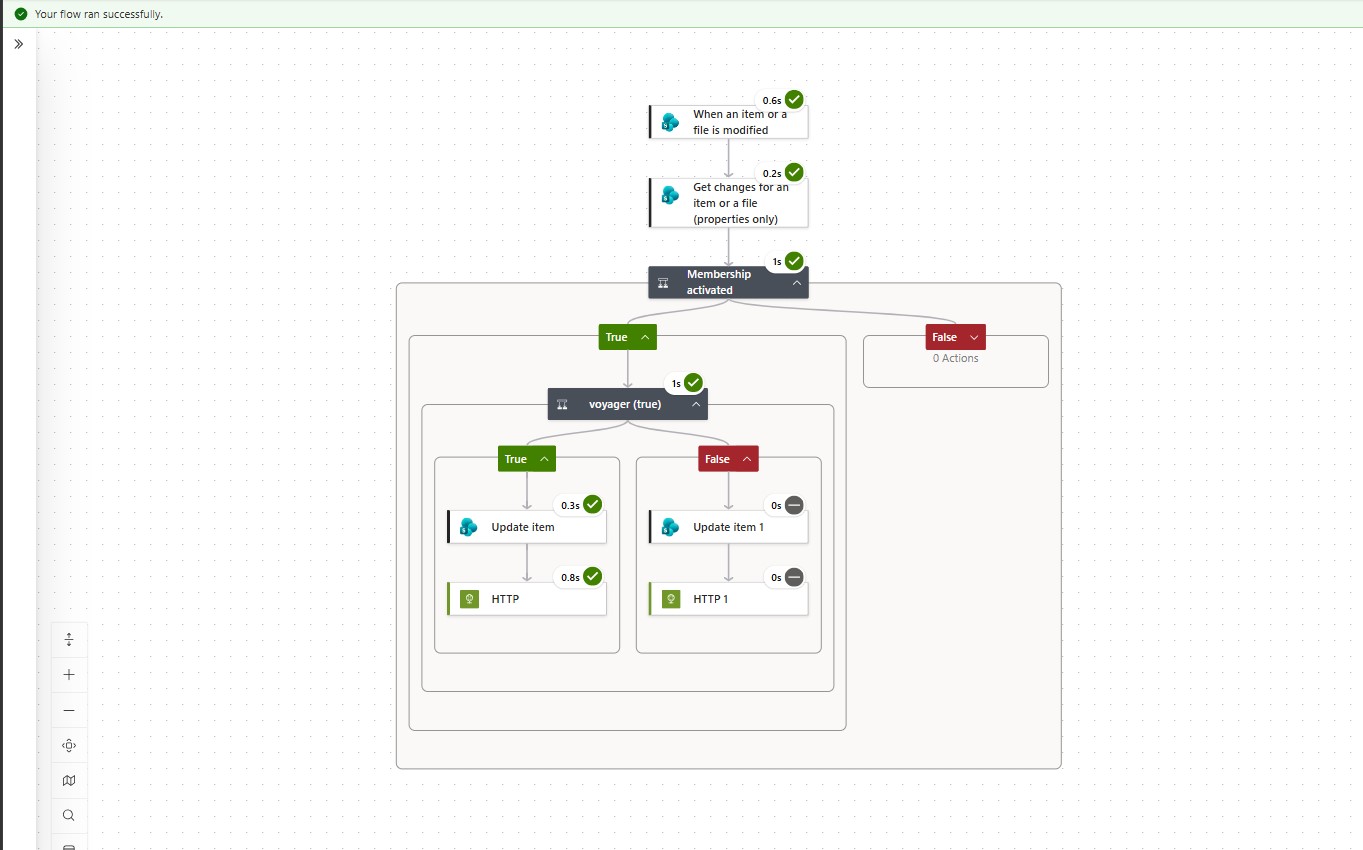
When an item is created or modified in SharePoint (for example, the team updates a member's lounge pass allocation or a travel benefit), a Power Automate flow triggers, maps the fields and pushes the update to WordPress/MemberPress through the API. The change shows up on the member's account on the website.
5.3 FluentForm → SharePoint
For any form that needs its data stored internally, FluentForm sends the submission to Power Automate through a webhook. The flow parses the data, validates it and creates a new item in the right SharePoint list.
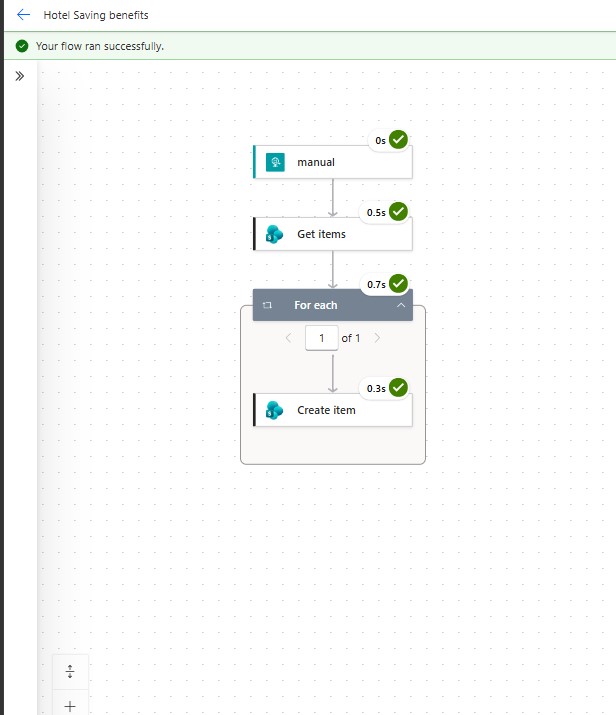
6. Sync Logic and Key Design Decisions
Two-way sync is more complex than one-way sync. These are the main problems I had to solve:
Preventing Infinite Loops
If WordPress updates SharePoint, and SharePoint then updates WordPress, the flows could trigger each other endlessly. To prevent this, I added safeguards such as comparing values before updating and using a "last modified by / source of change" check so a flow only runs when the change really came from the other system.
Unique Identifier Mapping
Each member and benefit record carries a shared unique ID (such as the MemberPress member ID or email) stored in both systems, so records are always matched correctly and never duplicated.
Create vs. Update Handling
Every flow first checks whether the record already exists, then branches into create or update, keeping the data clean.
Error Handling
Flows include run-after configurations and failure notifications so any failed sync is caught and can be fixed quickly instead of going unnoticed.
7. What Gets Synced
| Data | WordPress / MemberPress | SharePoint |
|---|---|---|
| Member details | ✅ | ✅ |
| Membership level / status | ✅ | ✅ |
| Airport lounge passes | ✅ | ✅ |
| Travel benefits | ✅ | ✅ |
| Other member benefits | ✅ | ✅ |
| Form submissions (FluentForm) | ✅ (source) | ✅ (stored) |
8. Tech Stack
- WordPress (website CMS)
- MemberPress (membership management)
- FluentForm (form builder and webhooks)
- Microsoft SharePoint (lists as the internal database)
- Power Automate Cloud (workflow automation)
- REST APIs / Webhooks (communication between systems)
9. Results and Impact
- Real-time, two-way sync: Changes in either system appear in the other automatically.
- Zero manual double entry: Staff time previously spent updating both systems is freed up.
- Accurate benefits for customers: Members always see the correct airport lounge passes and travel benefits.
- Centralized form data: Every important FluentForm submission is stored in SharePoint automatically.
- Fewer errors: Automated mapping and validation replaced error-prone manual updates.
- Scalable foundation: The system can grow with the member base without extra workload.
10. Key Learnings
- Two-way sync needs careful planning around loops, conflicts and unique IDs from the start.
- Power Automate Cloud is powerful for connecting WordPress with the Microsoft ecosystem when combined with webhooks and REST APIs.
- Good error handling and logging are essential for trust in any automation.
- Using tools the client already owns (SharePoint, MemberPress) kept the solution cost-effective and easy to maintain.
11. Conclusion
By connecting MemberPress, FluentForm, SharePoint and Power Automate, I delivered a seamless two-way sync that keeps AEFreedomEscapes' customer benefits, like airport lounge passes and travel perks, accurate everywhere. The business now runs on a single source of truth across both platforms, saving time, reducing errors and giving customers a better experience.
Want something similar?
If you need to integrate WordPress, MemberPress, forms or other tools with SharePoint or the Microsoft 365 ecosystem, feel free to get in touch.